First thing is first, if you get the that screen then open the "error.txt" file inside your sof2 folder and check this topic for a solution.
[Windows Vista/Windows 7]
If you get that window and there is no error.txt or the error.txt says "Access Denied" at the end of the first line, then it means you need to either:
Copy your SoF2 folder to the desktop (easiest and simplest way, 90% of people do it this way)
or
Run Fairplay as administrator(To stop the "do you want.." window opening everytime you run fp you can also disable UAC for fairplay, Google how to do it)
-------

This error just means that there are some programs that are interacting with sof2 which we haven't already put in the "allowed" list of programs. These are mostly Microsoft, Nvidia, ATI etc.
The only times your likely to see this error is the first time you use fairplay, when you update windows or your graphics card and when programs such as xfire update.
For example if your xfire just updated then you tried to use fairplay and it gave this error, just close xfire and fairplay will work(and later that night xfire will work again too when we add the new update to the list)
Something else you should check when this error comes is if you have a opengl32.dll in your game folder(perhaps you used it to watch a demo and forgot to delete it). If you do have a opengl32.dll in your folder then you must delete it before trying fairplay again(as we will never allow any opengl32s).
Screenshot of opengl32: click here
-------

This simply means that either fairplay isn't in your sof2 folder or your sof2 executible(the icon you click to open sof2) is named wrong.
If your fairplay isn't in the sof2 folder, then just move it there and then it should work.
Or if your sof2 icon isn't named "sof2mp.exe" or "sof2mp-test.exe" then rename it to "sof2mp.exe"(works for both full & demo) and then fairplay should work.
On Full your folder should look like this(delete everything else, except other mods such as RPMPro):
http://www.demobase....s/howtouse5.jpg
On Demo your folder should look like this:
http://www.demobase....ls/gooddemo.jpg
-------

On demo this error happens when your assets.pk3 has been edited from the original one.
On full this happens on full when your mp.pk3 has been edited from the original one.
If a file has the wrong check-sum(if it has been edited or corrupted) then Fairplay will rename it to blabla.pk3.zzz meaning that sof2 won't load it and boom here comes the error.
The only way to fix this is to re-download the game or get a friend to send you the original unedited.
You can re-download demo here:
http://www.caserun.com/games/demo.zip
or here:
Sof2files.com
You can re-download full here:
http://www.caserun.com/games/full.zip
or here:
SoF2 CD1 + SoF2 CD2
-------

This error means that your r_subdivisions is not 46, we force it to 46 because any lower(and way higher, 2000+) than that then you can lean inside the corners of walls and see through them. This is basically wallhack but without the cheat commands or programs.
To fix this just open up sof2 without fairplay and type /r_subdivisions 46 in the console.

-------

This error is just like the r_subdivisions error, we limit it because we don't allow 333 fps as you can use it to do impossible jumps(such as the so called "patio selfboost")
To fix this error just open up sof2 without fairplay and type /com_maxfps 125 in console (you can use any number from 30 to 200, i choose 125 because I can keep it almost constant inside main & case)

-------

This error is just like the the other cvar errors. We block this command because having it too high allows you to see through smoke grenades.
To fix this error just open up sof2 without fairplay and type /fx_nearcull 0 in console.

-------

This error means that you either don't have .net framework or your .net framework is old.
Fairplay requires the .net framework to work properly, because without it the server and client can't communicate and fairplay would be useless.
You can fix this error but download and installing .net framework 3.5, which you can get here:
http://caserun.com/fairplay/dotnetfx35sp1.exe
or here:
Microsoft.com
-------

This means that your fairplay cannot connect to the http://www.caserun.com website, which is needed for fairplay to check some settings.
There can be several reasons for this error, such as caserun.com being offline or your firewall blocking the fairplay.exe program.
To fix this, firstly check if you can access the http://www.caserun.com website via your web browser.
If you can, then it means that it's your computer which is blocking fairplay access to the Internet via - most likely - a firewall or a virus. Most people have different firewalls from others, so the easiest way to fix this is just to google "unblock program x firewall" where x = your firewall name, i.e. "unblock program AVG firewall" and follow the tutorials you should find.
If your cannot access the fairplay website, then caserun.com is probably offline, to confirm that just ask a few of your friends if they can go on caserun.com or not, if they can't then it's just a matter of waiting for caserun.com to come back online again. If your friends can access caserun.com and you can't then check your "hosts" file, which is normally found in C:\Windows\System32\drivers\etc. Open it in notepad and if you see something similar to "127.0.0.1 caserun.com" then you need to remove that line and save the file(on vista and windows 7 it's easier to copy the hosts file to desktop, take out the line and then copy it back into the "etc" folder)
-------
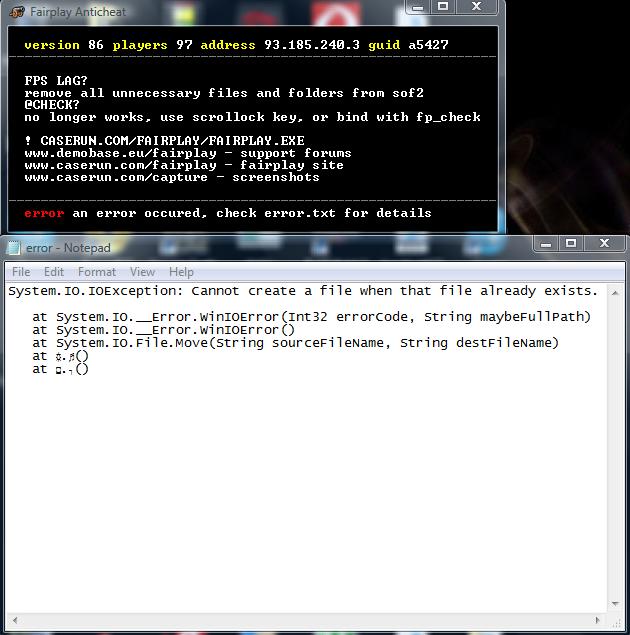
This means that fairplay is attemping to give a file or folder the .zzz extension when the file or folder already exists.
You can fix this by manually removing the files with the .zzz extension which are also there but without the .zzz extension, for example if "mp.pk3.zzz" AND "mp.pk3" both exist, then delete the "mp.pk3.zzz" file.
Thanks to Max for writing this solution & pointing it out to me.
--------------
I hope this helps some people fix there errors and have a hassle free fairplay

If you have anymore errors & know how to fix them, please post here and I'll add them in
Need help with Fairplay commands and cvars? Read this topic Fairplay Commands & Cvars