


step back to 125 FPS as 200 is horrible anyway
Toggle shoutbox
Shoutbox

|
|||||||||||||||||||||||||||||||||||||||||||||||||||||||||||||||||||||||||||||||||||||||||||

Config Settings (CFG)
Started by katana., Jun 25 2012 06:07 PM
105 replies to this topic

#44

legend
-

- Members
-

- 415 posts
Elite
- Location:switzerland
- Demo Clan:(- sw.&t -)
- Demo Team:-roAD-
- Fairplay Guid:72541
Posted 29 June 2012 - 10:14 AM
+ u get the smoothest result when ur fps equals to ur refresh rate (125=120 in this case as u cant set maxfps 120)
alright didnt know about that either, i will try it
edit: thx
Edited by legend, 29 June 2012 - 10:14 AM.


#46
bing bang blaow
-

- Members
-
- 8,122 posts
Super Elite
- Demo Clan:starelite
- Demo Team:??
- Full Clan:??
- Fairplay Guid:r0x0r
Posted 29 June 2012 - 11:58 AM
what mouse do you have? depends if it can handle higher freqWhich Polling Rate would you use for your mouse 125hz-1000hz
I used to play with 250hz, but i heard 500hz is way better & that 1000hz is unstable



#51

Posted 02 July 2012 - 08:31 AM
Nice topic Memo, moved it to helpdesk.

- MAPS AND MORE - www.dbmaps.co.nr
- MTS| - www.mtsclan.net
- Best sof2 action of the year - vimeo.com/52739118


#54
Doge
-

- Members
-
- 1,121 posts
so headshot, very skill, much pro... wow.
Posted 07 July 2012 - 07:52 PM
I remember seeing command to enable Anti-Aliasing in quake/sof2... but don't remember it and now can't find in google.
I want to enable anti-aliasing to 4x (by a command in cfg, not in catalyst)
and A-Filter to 16x.
anyone knows commands for these settings? thank you.
I want to enable anti-aliasing to 4x (by a command in cfg, not in catalyst)
and A-Filter to 16x.
anyone knows commands for these settings? thank you.
#55
fleim
-

- Members
-
- 3,502 posts
Contributor
- Location:Finland
Posted 07 July 2012 - 08:41 PM
such cmd does not exist, the only way to control AA/AF and other 3d settings is ur gfx card's control panel.I remember seeing command to enable Anti-Aliasing in quake/sof2... but don't remember it and now can't find in google.
I want to enable anti-aliasing to 4x (by a command in cfg, not in catalyst)
and A-Filter to 16x.
anyone knows commands for these settings? thank you.

#57

Posted 14 November 2012 - 11:15 AM
Gj katana most useful thing I found on demobase.Since everyone has a different PC and preferences, It's always best to create your own cfg.
This will be like a tutorial to help out those in need. Enjoy and happy gaming!
And remember, it is best if you put these commands in your cfg manually instead of in sof.
Open your config with notepad/wordpad and press ctrl+f and type in for example: r_picmip and change the values.
If it doesnt find a certain command add it manually.
GRAPHICS -
The goal is to achieve stable 125 FPS.
- r_picmip (0-4) changes the overall texture quality, use 4 if u prefer lower graphics
- r_lodbias (0-4) changes the geometric detail level, use 4 if u prefer lower graphics
- r_simplemipmaps (0/1) changes the sharpness of all the items, use 0 if u prefer lower graphics
- r_colorbits (16/32) sets the color depth, using 16bit colors wont give u a noticeable fps boost and it also makes it harder to see through nades
- r_texturebits (16/32) changes the texture quality, unlike with colorbits, using a value of 16 here might give u a little fps boost and it wont affect the nades
- fx_countscale (0.25-1) reduces the greyish smoke coming from the nades when a value of 0.25 is used
- r_detailtextures (0/1) changes the detail layers used, use 0 if u prefer lower graphics
- fp_vertexlight (0/1) changes the lighting of the map, probably one of the only commands that give u a noticeable fps boost when used, can make the view worse at some particular spots
- cg_fov (80-100) determines the field of vision which is basically how much u see on ur screen when ur not moving
- r_subdivisions (46-999) Put it to 999, it will increase your FPS, not by much but every little thing can help!
- seta r_displayrefresh "75" This Depends on your monitor refreshrate, see what the max your monitor can handle, and add that in your config manually.
MOUSE SETTINGS
This is personal for everyone, just experiment and see what you feel comfortable with
It is recommended not to change these settings once you find your preference.
put these to zero:
cg_bobup "0"
cg_bobpitch "0"
cg_bobroll "0"
cg_runpitch "0"
cg_runroll "0"
- m_pitch, changes the vertical (up-down) sensitivity, some people still think using a lower value decreases ur recoil which is plain bullshit
- m_yaw, changes the horizontal (left-right) sensitivity
- cl_mouseaccel, sets the acceleration of ur mouse ingame
Make sure u installed the drivers for ur mouse, else it may not work as it should do)
CONNECTION -
Lowest ping with the smoothest lagometer.
- rate, controls all the packets u send and recieve, this should be set to 15000-30000 depending on ur connection
- cl_maxpackets, limits the amount of packets sent to the server, do not set this below 30 or it will cause some little warping. the best value for this (when using com_maxfps 125) is 63 cause the amount of frames u send to the server is either every frame, every second frame and so on. its not possible to set it to 125 so its better to use 63 (125/2=62.5) for the optimal bullet reg.
- snaps, determines the amount of updates u recieve from the server, anyone with an ok connection should use a value of 40 on this one
- cl_timenudge, originally its made for decreasing the delay of highpingers but it also works other way around. inserting a negative value such as -5 might help ur bullet reg a little
- com_maxfps, sets the max fps, the more the better, 200 makes it a little easier to land some spray kills but u wont be able to move the same way than with 125
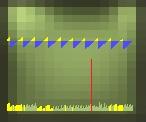
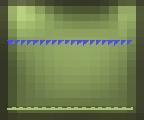
- cg_lagometer, with this enabled ur able to see any packet loss and/or lags u get and have them explained. i dont want to make it too complicated so ill just mention the red lines are packet loss.
this is what it looks like when u have bad connection settings and/or ur connection is not stable:
this is what its supposed to look like when ur rates are fine and ur connection isnt lagging:
Some side notes: If you cant get stable 125 fps, you could lower your fps up to the point where it doesnt jump up and down for some smoother gameplay.
I dont recommend anything lower than 90-100 though.
You can find your lowest fps by adding ''cg_drawfps 1'' in your cfg and throw a couple nades while standing on patio (stand a bit to the corner side)


#60
katana.
-
- Members
-
- 5,544 posts
Game Recognize Game
- Demo Team:-023-
Reply to this topic

1 user(s) are reading this topic
0 members, 1 guests, 0 anonymous users


